Instructor Training
Below are resources that will help you on your journey using the Respondus Lockdown Browser.
NOTE: Southwestern has licensed the Lockdown Browser only - we have not licensed Monitor (the proctoring tool).
- Overview Video
- Instructor Quick Start Guide (PDF)
- Instructor Training Webinars
- In-App Training Videos & Guides
- Office Hours with Respondus Trainers
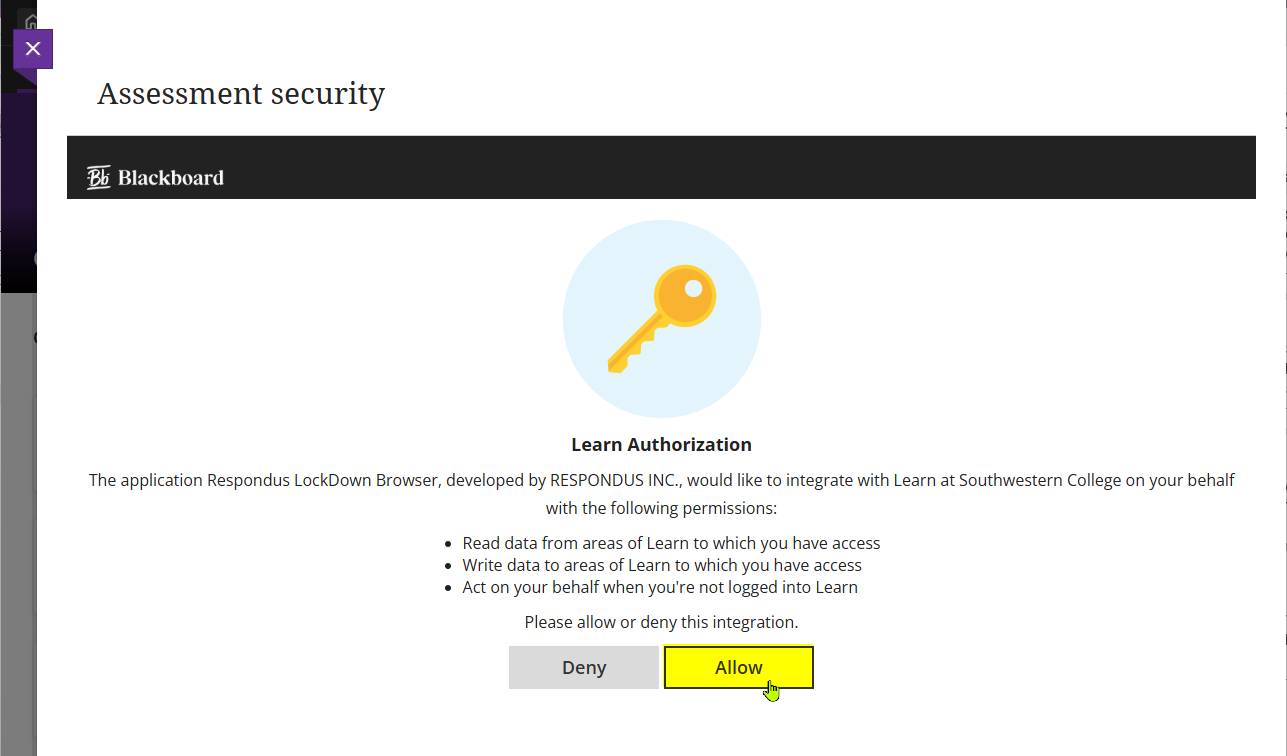
NOTE: The Respondus Lockdown Browser has been installed on the College's Blackboard system and is available for use by all SCKANS faculty. The first time you launch the Respondus Lockdown Browser in Blackboard, you will get a screen similar to the screenshot below. To proceed, you will have to click the Allow button:
The video below will show how to configure a Blackboard quiz to require the Respondus Lockdown Browser:

Student Support
A page similar to this one, but oriented to students, is available at: https://link.sckans.edu/lockdown-browser-student-support
Related Resources:
Accessibility Overview (Commitment to Accessibility)
Localized Languages (Language Support in LockDown Browser)
Operational Status Page (Is Respondus up or down? Check here.)
Was this article helpful?
That’s Great!
Thank you for your feedback
Sorry! We couldn't be helpful
Thank you for your feedback
Feedback sent
We appreciate your effort and will try to fix the article